> ## Documentation Index
> Fetch the complete documentation index at: https://hc.starbridge.ai/llms.txt
> Use this file to discover all available pages before exploring further.
# Buyer Summary
Buyer Summary gives reps a single, structured briefing on any account — generated automatically from your bridge data, available wherever they work in Starbridge.
***
## What is Buyer Summary?
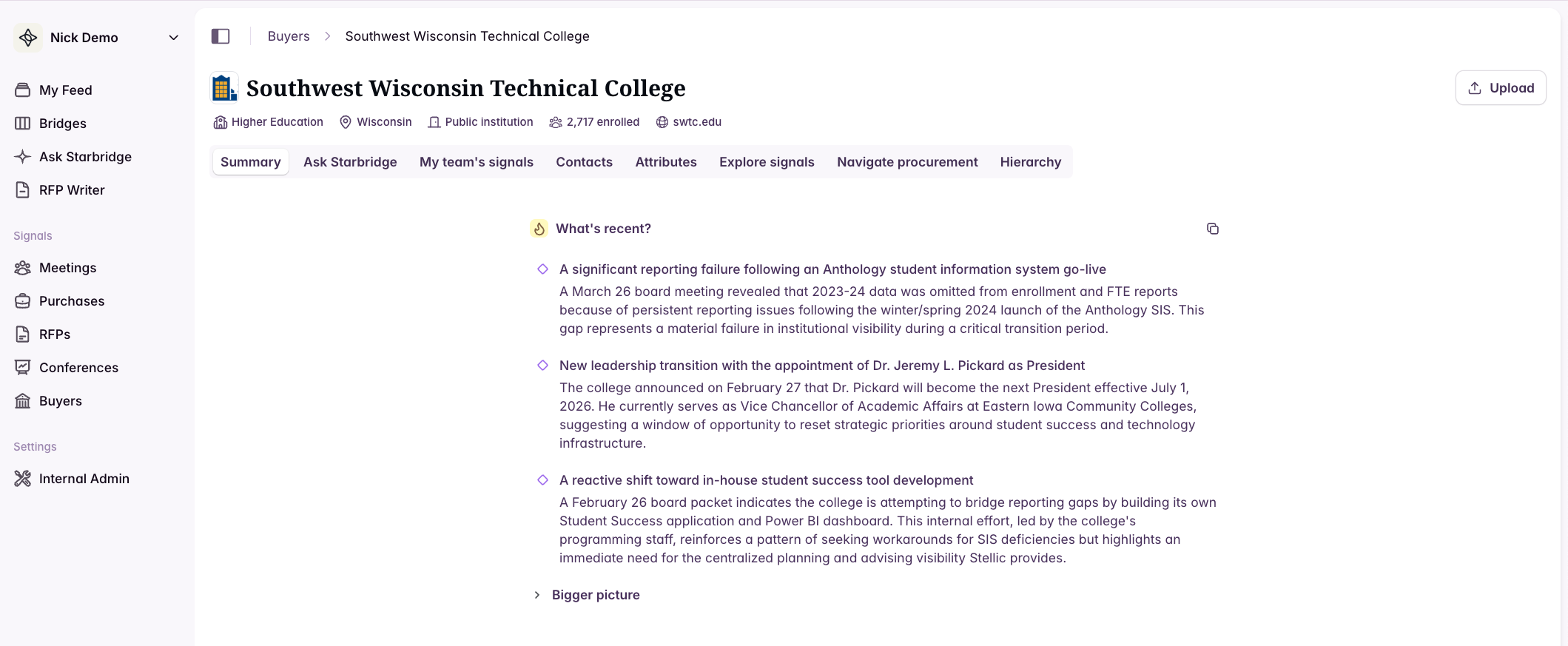
When a rep opens a buyer page or clicks into a signal from their feed, they shouldn't have to manually piece together what's happening at that account. Buyer Summary does that work for them: it reads across all bridge data tied to a buyer and generates a concise, cited briefing organized around what matters right now.
 ***
## What's in a Buyer Summary?
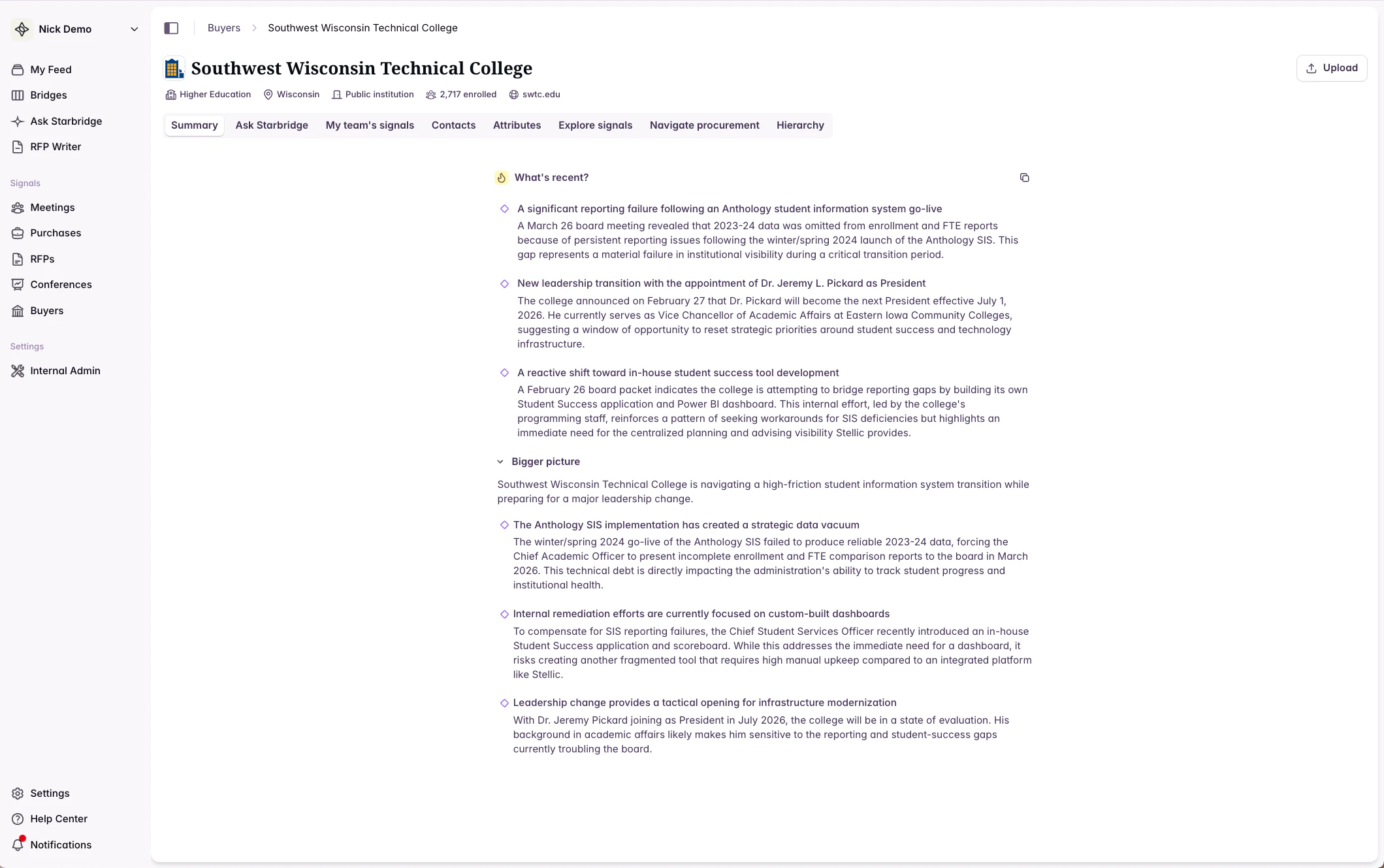
Each summary has two sections:
### What's recent
Always visible. Two to four bullets covering the most consequential recent signals — board decisions, contract milestones, leadership transitions, emerging trends. This is what a rep needs to read before a call.
### Bigger picture
Deeper context on the account's current initiatives, operating environment, competitive landscape, and procurement considerations. Expands on demand.
***
## What's in a Buyer Summary?
Each summary has two sections:
### What's recent
Always visible. Two to four bullets covering the most consequential recent signals — board decisions, contract milestones, leadership transitions, emerging trends. This is what a rep needs to read before a call.
### Bigger picture
Deeper context on the account's current initiatives, operating environment, competitive landscape, and procurement considerations. Expands on demand.
 ***
## Citations
Every claim in a Buyer Summary is grounded in a specific bridge signal. Citations appear as dotted underlines on the relevant text.
* **Hover** over a citation to see the source snippet inline
* **Click** a citation to open the original document, meeting transcript, or bridge entry
***
## Citations
Every claim in a Buyer Summary is grounded in a specific bridge signal. Citations appear as dotted underlines on the relevant text.
* **Hover** over a citation to see the source snippet inline
* **Click** a citation to open the original document, meeting transcript, or bridge entry
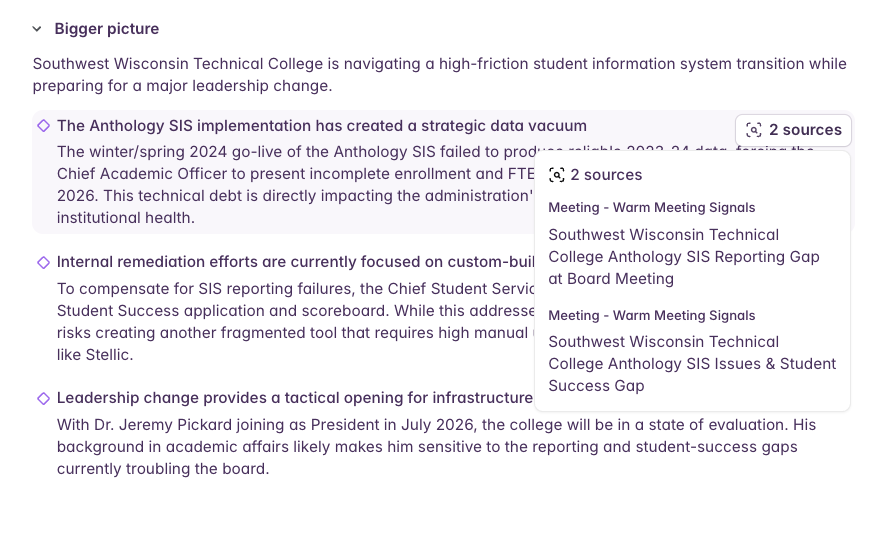 This means reps can always trace a claim back to its source — and go deeper if they want to.
***
## Where Buyer Summary appears
### Buyer pages
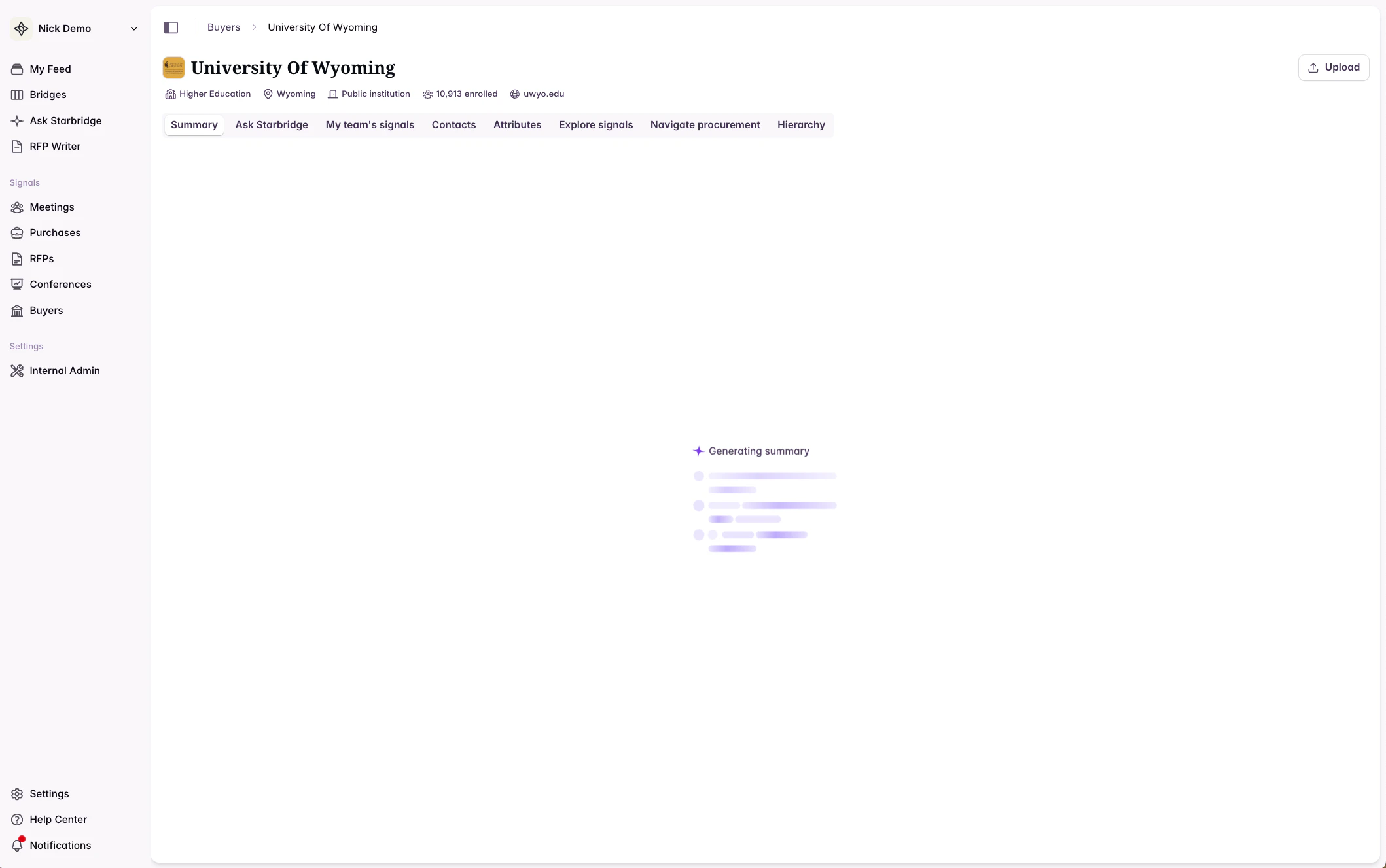
The Summary tab is the first tab on every buyer page. It generates in a few seconds when the page loads.
This means reps can always trace a claim back to its source — and go deeper if they want to.
***
## Where Buyer Summary appears
### Buyer pages
The Summary tab is the first tab on every buyer page. It generates in a few seconds when the page loads.
 ### The feed
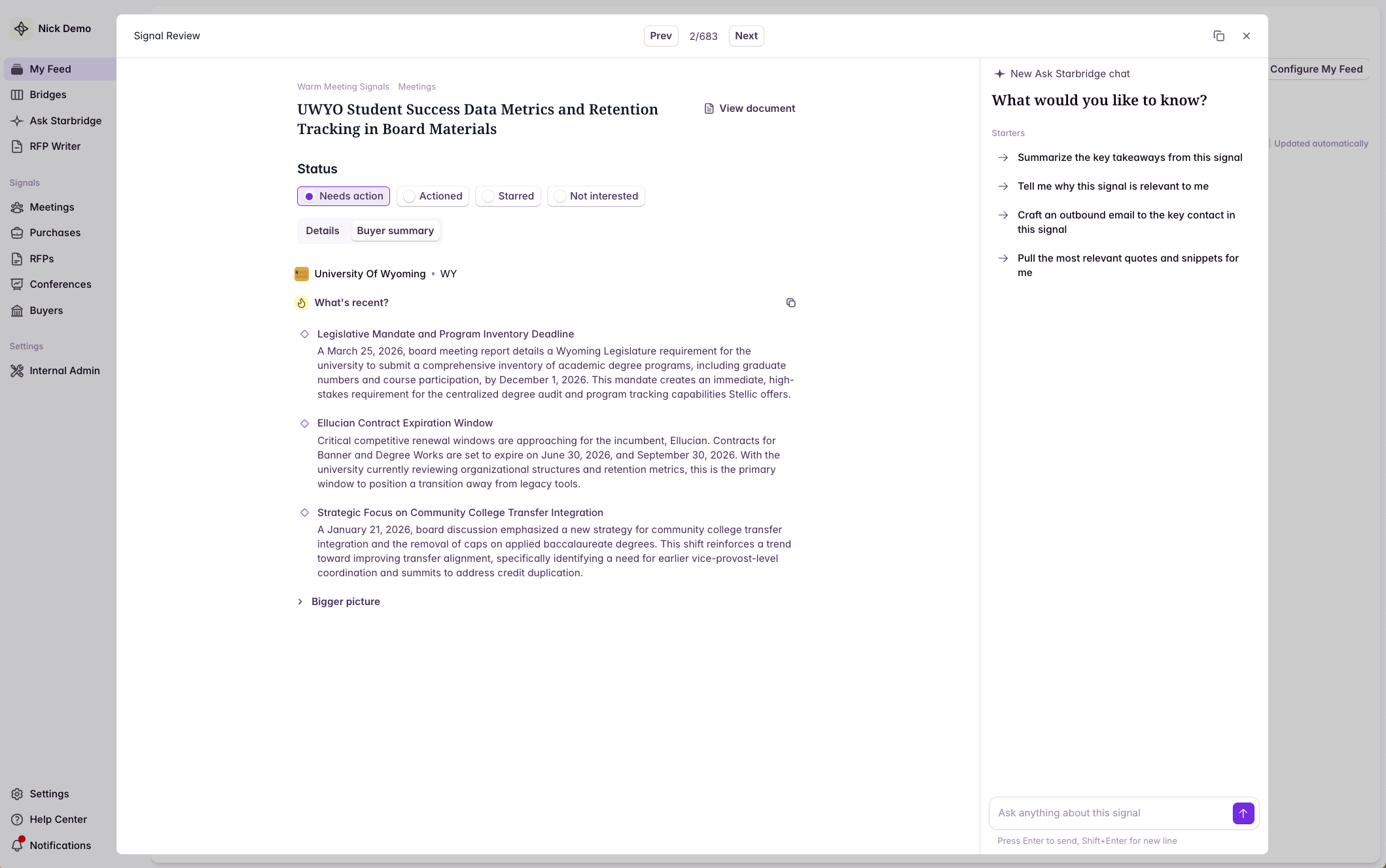
When a rep clicks into a signal from their home feed to review it, a **Buyer Summary tab** is available alongside the signal detail. This gives reps broader account context without leaving the feed workflow.
### The feed
When a rep clicks into a signal from their home feed to review it, a **Buyer Summary tab** is available alongside the signal detail. This gives reps broader account context without leaving the feed workflow.
 ***
## Using Buyer Summary in bridges
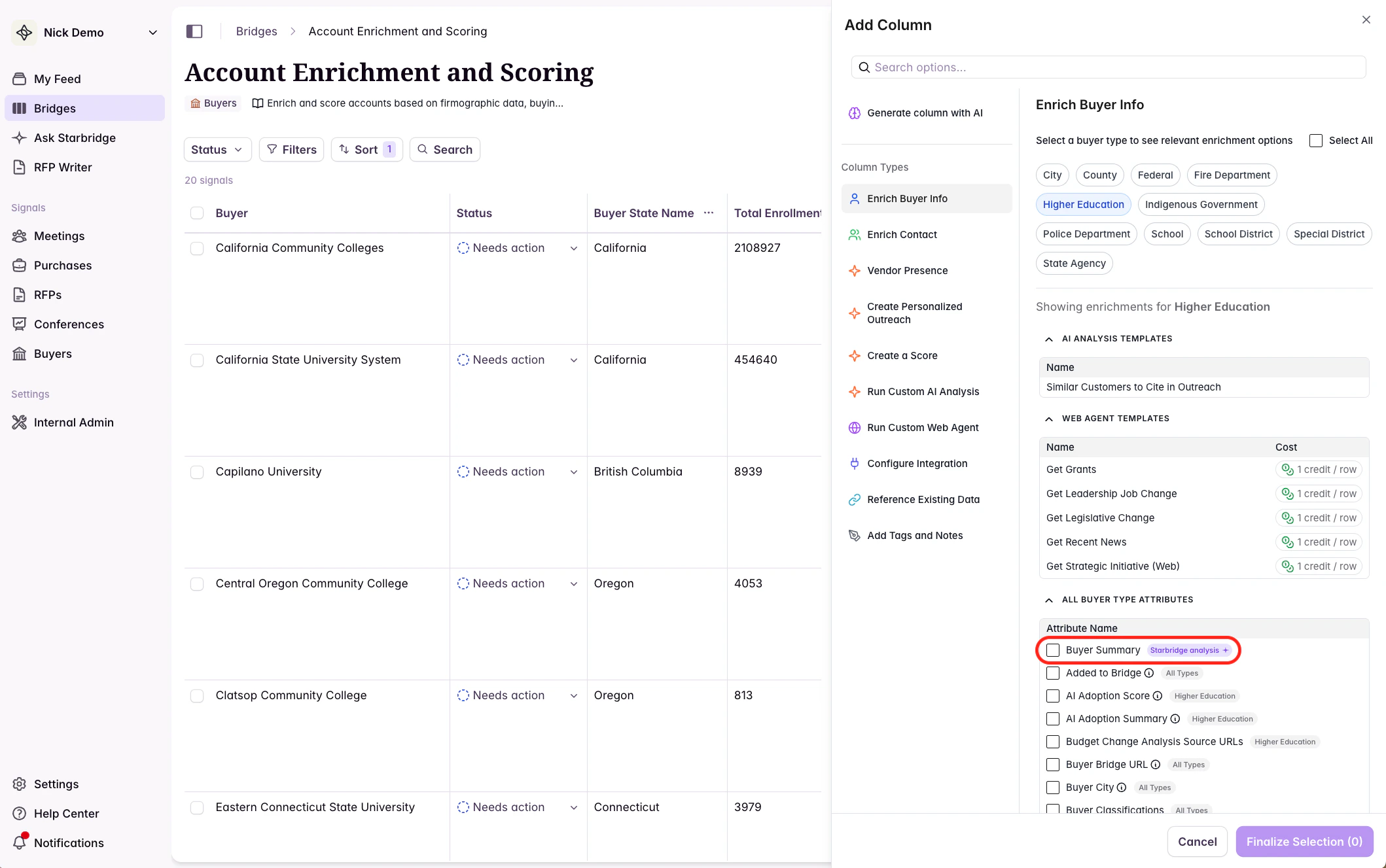
Buyer Summary is available as an **Add Column** enrichment in any bridge. This lets you extend the summary beyond the Starbridge UI and put it to work in your broader workflows.
To add it:
1. Open any bridge
2. Click **Add Column**
3. Select **Buyer Summary** from the enrichment options
***
## Using Buyer Summary in bridges
Buyer Summary is available as an **Add Column** enrichment in any bridge. This lets you extend the summary beyond the Starbridge UI and put it to work in your broader workflows.
To add it:
1. Open any bridge
2. Click **Add Column**
3. Select **Buyer Summary** from the enrichment options
 ### Sync to your CRM
Once added as a column, you can sync Buyer Summary to a field on the Account object in Salesforce or HubSpot. Reps get current account context directly in their CRM record — no need to log back into Starbridge before a call.
See [Salesforce + HubSpot](https://hc.starbridge.ai/integrations/syncing-to-your-crm-sfdc-or-hubspot) for setup instructions.
### Use as input to generated emails
Buyer Summary gives outbound email columns a holistic view of the account — not just a single signal — so personalization can reflect what's actually happening across all of a buyer's bridges.
See [Craft Personalized Outbound Emails](https://hc.starbridge.ai/builders/craft-personalized-outbound-emails) for examples.
### Feed into account scoring
Add Buyer Summary as context in your Buyer bridge to give your account scoring model a fuller picture of each account's current state.
See [Account Scoring || Buyer Bridge](https://hc.starbridge.ai/builders/account-scoring-buyer-bridge) for setup instructions.
### Use as input to any AI Analysis column
Because Buyer Summary synthesizes all bridge data for a buyer, it's a useful input for any AI Analysis column that benefits from broader account context.
See [AI Analysis Example Prompts](https://hc.starbridge.ai/builders/example-prompts-for-ai-analysis) for ideas.
***
## How Buyer Summary is generated
Buyer Summary draws from all bridge data tied to a buyer, including:
* All bridge entries linked to the buyer, dated within the past six months
* Account scoring data from the Buyer bridge, if present
The summary is grounded only in what's in your bridge data — it won't speculate or fill gaps. If a section doesn't have enough signal to say something meaningful, it says so.
The summary re-generates automatically whenever a rep looks at it in a buyer page or their feed. Outside of that, when added to a bridge, the summary re-generates on your specified cadence.
***
## Frequently Asked Questions
**How long does it take to generate?** A few seconds. A brief animation plays while it loads.
**Does it update automatically?** Yes. The summary re-generates automatically whenever a rep looks at it in a buyer page or their feed. Outside of that, when added to a bridge, the summary re-generates on your specified cadence.
**What bridges does it draw from?** All bridges that contain entries tied to the buyer. Entries marked `Not interested` are excluded.
**Can I customize the prompt for the summary?** Not currently. Reach out to your CSA if you have an use case in mind.
**What if there's not much bridge data for a buyer?** The summary reflects what's available. If a section can't be meaningfully populated from the data, it will say so rather than speculate.
***
Questions? Reach out to your Customer Solutions Architect or contact [support@starbridge.ai](mailto:support@starbridge.ai).
### Sync to your CRM
Once added as a column, you can sync Buyer Summary to a field on the Account object in Salesforce or HubSpot. Reps get current account context directly in their CRM record — no need to log back into Starbridge before a call.
See [Salesforce + HubSpot](https://hc.starbridge.ai/integrations/syncing-to-your-crm-sfdc-or-hubspot) for setup instructions.
### Use as input to generated emails
Buyer Summary gives outbound email columns a holistic view of the account — not just a single signal — so personalization can reflect what's actually happening across all of a buyer's bridges.
See [Craft Personalized Outbound Emails](https://hc.starbridge.ai/builders/craft-personalized-outbound-emails) for examples.
### Feed into account scoring
Add Buyer Summary as context in your Buyer bridge to give your account scoring model a fuller picture of each account's current state.
See [Account Scoring || Buyer Bridge](https://hc.starbridge.ai/builders/account-scoring-buyer-bridge) for setup instructions.
### Use as input to any AI Analysis column
Because Buyer Summary synthesizes all bridge data for a buyer, it's a useful input for any AI Analysis column that benefits from broader account context.
See [AI Analysis Example Prompts](https://hc.starbridge.ai/builders/example-prompts-for-ai-analysis) for ideas.
***
## How Buyer Summary is generated
Buyer Summary draws from all bridge data tied to a buyer, including:
* All bridge entries linked to the buyer, dated within the past six months
* Account scoring data from the Buyer bridge, if present
The summary is grounded only in what's in your bridge data — it won't speculate or fill gaps. If a section doesn't have enough signal to say something meaningful, it says so.
The summary re-generates automatically whenever a rep looks at it in a buyer page or their feed. Outside of that, when added to a bridge, the summary re-generates on your specified cadence.
***
## Frequently Asked Questions
**How long does it take to generate?** A few seconds. A brief animation plays while it loads.
**Does it update automatically?** Yes. The summary re-generates automatically whenever a rep looks at it in a buyer page or their feed. Outside of that, when added to a bridge, the summary re-generates on your specified cadence.
**What bridges does it draw from?** All bridges that contain entries tied to the buyer. Entries marked `Not interested` are excluded.
**Can I customize the prompt for the summary?** Not currently. Reach out to your CSA if you have an use case in mind.
**What if there's not much bridge data for a buyer?** The summary reflects what's available. If a section can't be meaningfully populated from the data, it will say so rather than speculate.
***
Questions? Reach out to your Customer Solutions Architect or contact [support@starbridge.ai](mailto:support@starbridge.ai).