> ## Documentation Index
> Fetch the complete documentation index at: https://hc.starbridge.ai/llms.txt
> Use this file to discover all available pages before exploring further.
# March 2026: Buyer Summary
### Overview
Buyer Summary gives every rep a single, up-to-date briefing on each account the moment they need it - no manual research, no stitching together signals from across their bridges. It's generated automatically from your bridge data and is available wherever reps work in Starbridge.
 ### What your reps experience
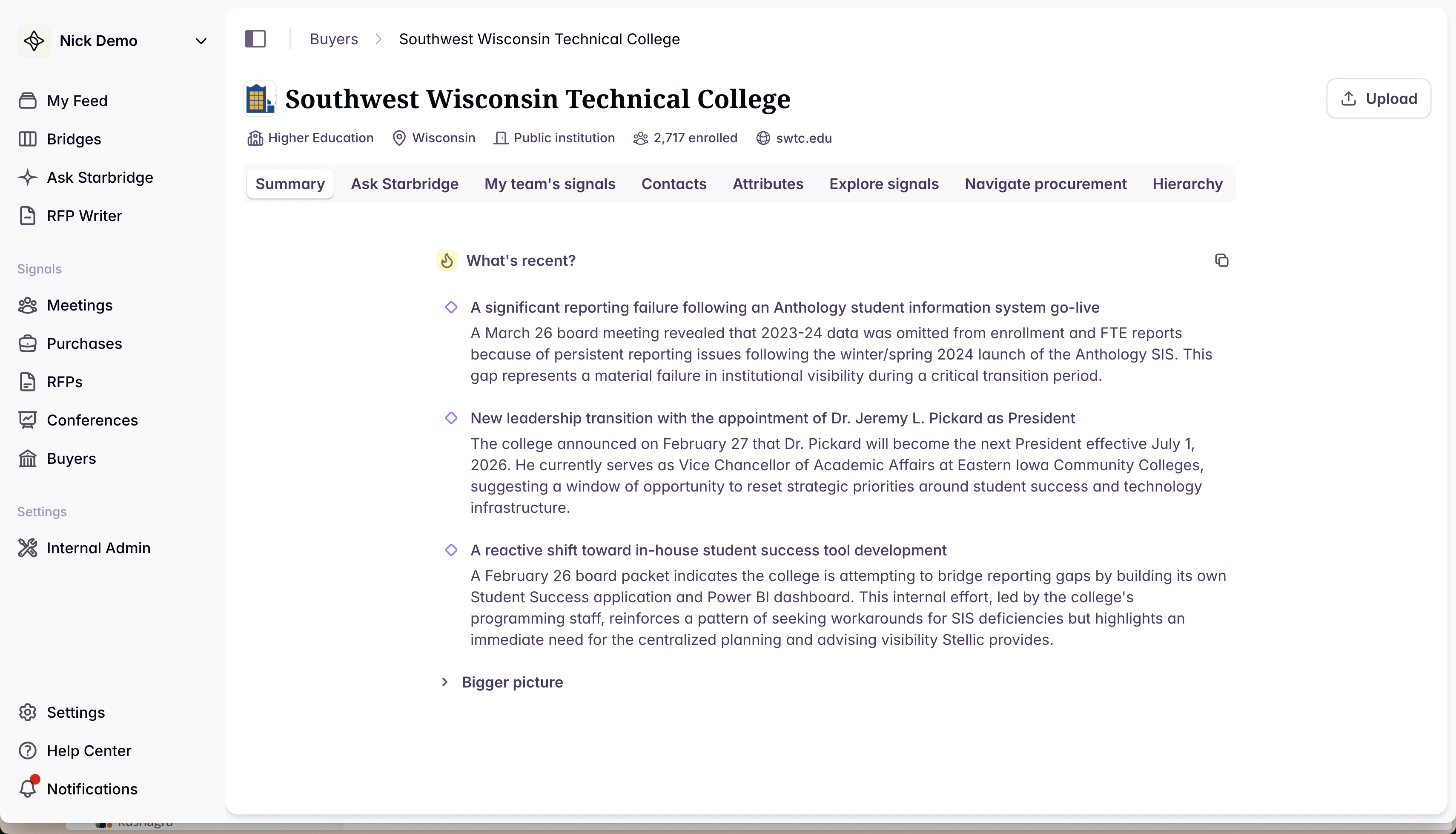
When a rep opens a buyer page, the **Summary tab** is the first thing they see. It generates in a few seconds and gives them a structured briefing organized into two layers:
* **What's recent** — the most consequential trends and signals from the past few weeks or months, always visible at a glance
* **Bigger picture** — deeper context on the account's operating environment, initiatives, and competitive landscape
Every claim in the summary is grounded in a source signal. Reps can hover over a section to see its sources, and click through to each source and its original document or meeting transcript.
### What your reps experience
When a rep opens a buyer page, the **Summary tab** is the first thing they see. It generates in a few seconds and gives them a structured briefing organized into two layers:
* **What's recent** — the most consequential trends and signals from the past few weeks or months, always visible at a glance
* **Bigger picture** — deeper context on the account's operating environment, initiatives, and competitive landscape
Every claim in the summary is grounded in a source signal. Reps can hover over a section to see its sources, and click through to each source and its original document or meeting transcript.
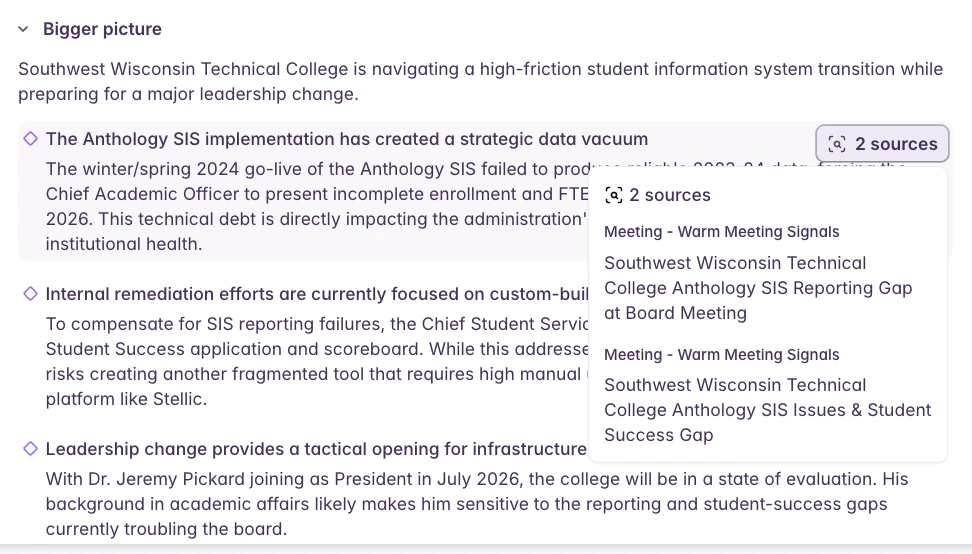 The same summary is available in the **feed**: when a rep clicks into a signal for more detail, a Buyer Summary tab shows the broader account context alongside the signal itself — so reps never have to leave their workflow to get oriented.
### What builders experience
Buyer Summary is also available as an **Add Column enrichment** in any bridge. That means you can:
* **Sync it to your CRM** — push a current account summary to a field on the Account object in Salesforce or HubSpot, so context travels with the record wherever your team works
* **Use it as input to generated emails** — give your outbound email columns richer account context, so personalization goes beyond a single signal
* **Feed it into account scoring** — use the summary as additional context when generating or refining account scores in your Buyer bridge
* **Power any other AI Analysis column** — because the summary captures what's happening across all of a buyer's bridges, it's a useful input for any column that benefits from a holistic view of the account
The summary is grounded in all bridge data tied to a buyer — including account scoring — and stays current: it re-generates automatically whenever the underlying bridge data changes.
### Get started
Buyer Summary is available now on all buyer pages and in My Feed. To add it as a column enrichment in a bridge, open any bridge, click **Add Column**, and select **Buyer Summary** from the enrichment options.
Read the complete documentation here: [Buyer Summary](/data/buyer-summary). Reach out to your CSA if you have questions about how to wire it into your email or scoring workflows.
The same summary is available in the **feed**: when a rep clicks into a signal for more detail, a Buyer Summary tab shows the broader account context alongside the signal itself — so reps never have to leave their workflow to get oriented.
### What builders experience
Buyer Summary is also available as an **Add Column enrichment** in any bridge. That means you can:
* **Sync it to your CRM** — push a current account summary to a field on the Account object in Salesforce or HubSpot, so context travels with the record wherever your team works
* **Use it as input to generated emails** — give your outbound email columns richer account context, so personalization goes beyond a single signal
* **Feed it into account scoring** — use the summary as additional context when generating or refining account scores in your Buyer bridge
* **Power any other AI Analysis column** — because the summary captures what's happening across all of a buyer's bridges, it's a useful input for any column that benefits from a holistic view of the account
The summary is grounded in all bridge data tied to a buyer — including account scoring — and stays current: it re-generates automatically whenever the underlying bridge data changes.
### Get started
Buyer Summary is available now on all buyer pages and in My Feed. To add it as a column enrichment in a bridge, open any bridge, click **Add Column**, and select **Buyer Summary** from the enrichment options.
Read the complete documentation here: [Buyer Summary](/data/buyer-summary). Reach out to your CSA if you have questions about how to wire it into your email or scoring workflows.