> ## Documentation Index
> Fetch the complete documentation index at: https://hc.starbridge.ai/llms.txt
> Use this file to discover all available pages before exploring further.
# Managing sequences
> Monitor your sequences, read replies, pause and resume, and understand every sequence, recipient, and step status.
The **Sequences** page lists everything running in your org. Open a sequence to see its recipients, activity, replies, and settings.
## The sequences list
Each sequence shows its name, type, status, how many recipients it has, its source, and who built it.
Filter by status to focus on what needs attention: Draft sequences you haven't finished, Generated sequences waiting on an inbox, Active sequences currently sending.
## Pausing and resuming
Pausing stops sending immediately and holds every pending message without losing anyone's place. Remaining steps move to **Paused** status.
Resuming picks each recipient up where they left off. Anything that would have sent during the pause queues to go out as soon as your send window allows.
Pause when you need to edit steps, when something looks wrong in the copy, or when your team can't keep up with replies. There's no penalty for pausing, and it's the safer move if you're unsure.
If every inbox assigned to a sequence disconnects, Starbridge pauses the sequence automatically rather than failing sends silently.
## Duplicating and deleting
**Duplicate** copies a sequence's steps and settings into a new Draft, without its recipients. Use it to run a variation of a play that's working, or to reuse a structure for a different audience.
**Delete** removes the sequence entirely. Pause first and confirm nobody is mid-sequence, since deleting stops outreach for everyone still enrolled.
## Recipients
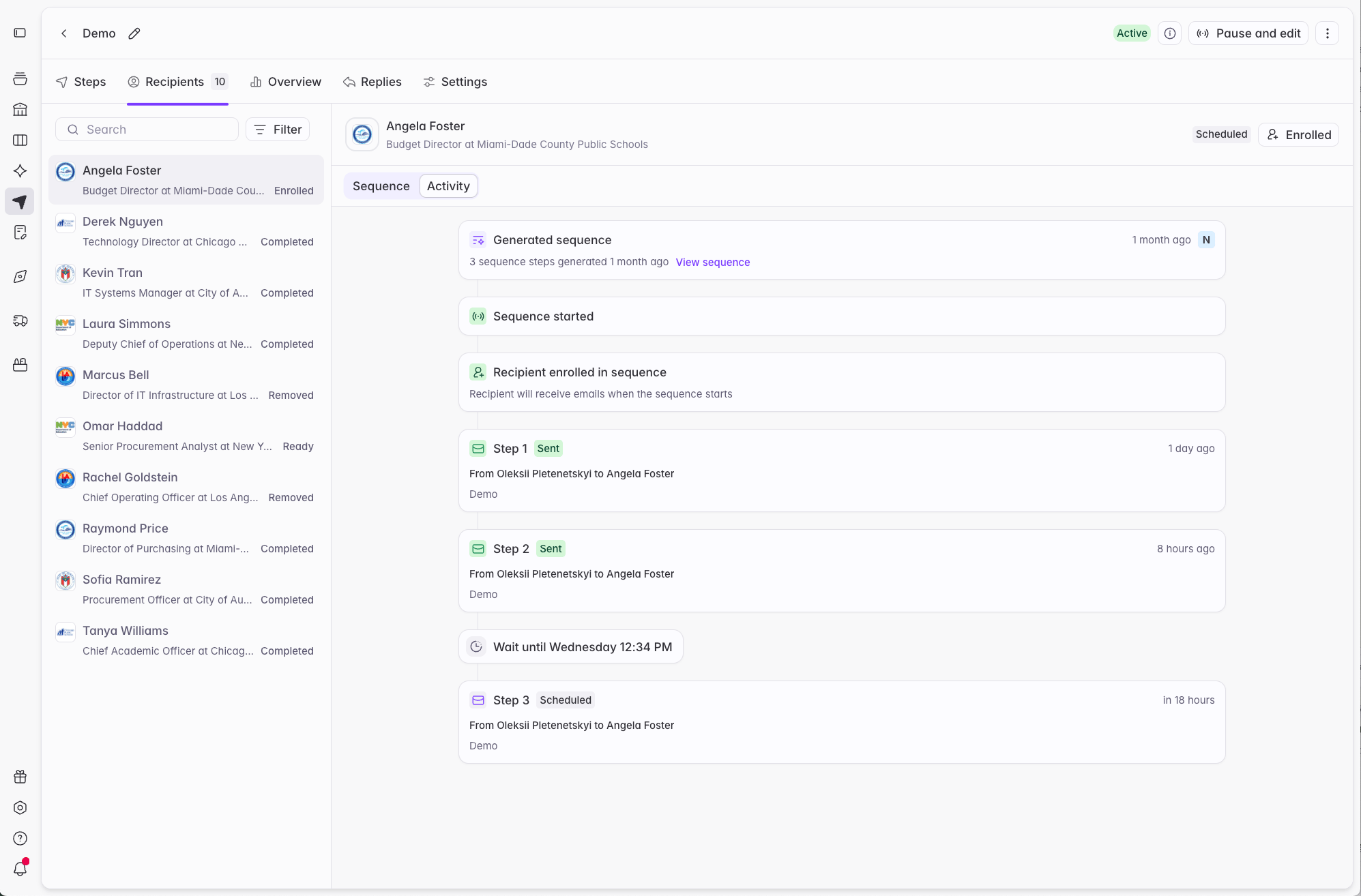
The recipients view shows everyone in the sequence and where they've got to. Filter by status to answer the questions that come up most: who's still Ready and needs enrolling, who's Enrolled and in flight, who's Completed, and who was Removed.
You can change a recipient's status here. Mark someone **Removed** to stop their remaining steps, or **Completed** if you've taken the conversation elsewhere.
 ## Replies
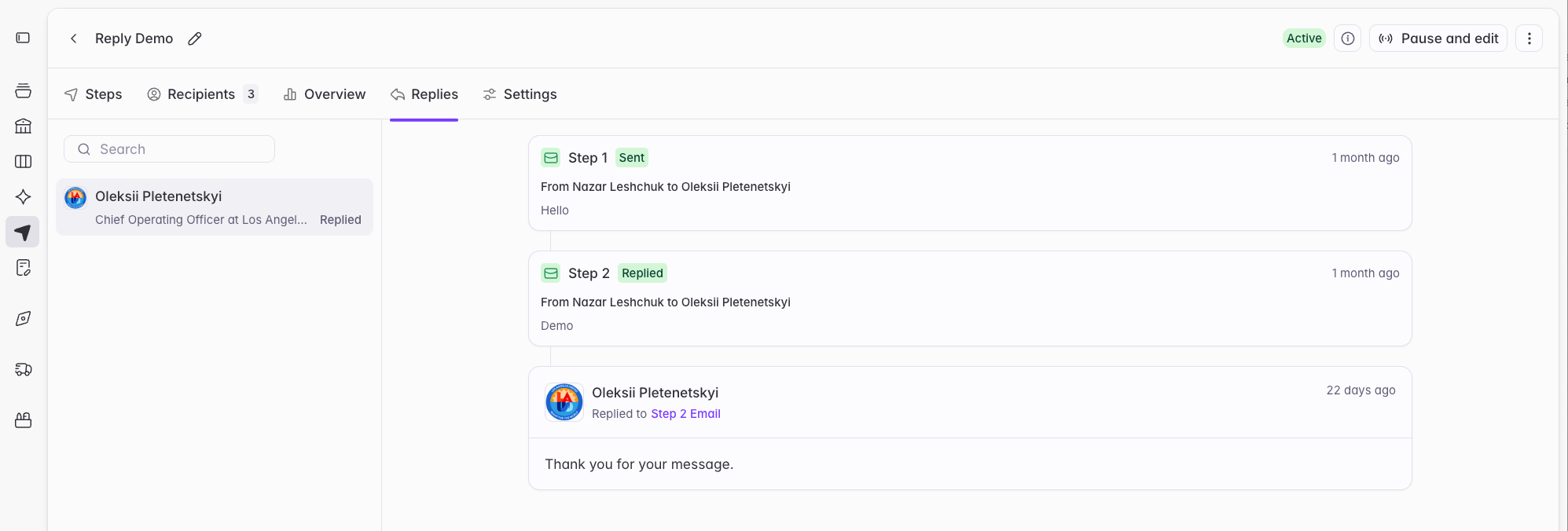
The **Replies** tab collects replies to the sequence, each showing the recipient and the thread context, so you can see responses without watching the connected inbox.
A reply stops the sequence for that contact automatically and moves them to **Completed**. Continue the conversation from your own inbox.
## Replies
The **Replies** tab collects replies to the sequence, each showing the recipient and the thread context, so you can see responses without watching the connected inbox.
A reply stops the sequence for that contact automatically and moves them to **Completed**. Continue the conversation from your own inbox.
 ## Status reference
Sequences track state at three levels: the sequence itself, each recipient in it, and each step for each recipient.
### Sequence statuses
| Status | What it means | What you can do |
| ------------- | ------------------------------------------------------- | --------------------------------------------------------------------------- |
| **Draft** | Being built, or being edited after generation | Edit everything: steps, cadence, data source, settings |
| **Generated** | Messages generated for every recipient, not yet sending | Review recipients and copy, edit existing steps, connect an inbox, activate |
| **Active** | Sending, on the schedule you configured | Pause, edit unsent step copy, add and remove recipients |
| **Paused** | Sending stopped, progress preserved | Resume, edit unsent step copy |
A Bridge-based sequence becomes **Active** once an inbox is connected and you activate it.
Team sequences are Active as soon as they're created. They start empty, so nothing sends immediately. Reps can begin enrolling contacts right away.
### Recipient statuses
The status that matters most is the difference between the first two.
A **Ready** recipient means a sequence has been generated for this contact, but nothing will send. This is the review state. "Ready" exists so you can read the generated copy before committing to sending this contact any emails.
**Enrolled** means the contact is live. Sending is underway or scheduled.
A contact in **Ready** status will never receive an email. Someone has to enroll them, so they are set to **Enrolled** status.
| Status | What it means |
| ------------- | ------------------------------------------------------------------------------------- |
| **Ready** | Sequence generated for this contact; nothing sends until they're enrolled |
| **Enrolled** | Actively sending, or scheduled to send |
| **Completed** | Finished the sequence, or stopped early because they replied or their address bounced |
| **Removed** | Taken out of the sequence; no further sends |
A recipient moves to **Completed** on its own once every step has sent. It also completes early when they reply to any message in the sequence, or when an address hard-bounces. You can mark someone Completed manually, which stops their remaining steps.
A recipient moves to **Removed** when someone removes them manually, when they're on your blocklist or unsubscribe list, when their account is on an exclusion list applied to the sequence, or when they're already enrolled in another sequence. Removing a recipient stops all their remaining steps immediately.
You can re-enroll a removed recipient manually, unless the reason they were removed still applies. A blocklisted or unsubscribed contact can't be re-enrolled. Re-enrolling a recipient restarts their sequence from step 1.
### One contact, one sequence
A contact can be **Enrolled** in only one Active or Paused sequence at a time. If a contact is already enrolled somewhere and something tries to add them to another sequence, whether that's a Bridge update, a rep enrolling them, or a one-off, they're added in **Removed** status with their steps stopped, and can't be enrolled until they exit the first sequence.
This applies only to Active and Paused sequences. A contact can sit in **Ready** status across several generated sequences at once, because nothing is sending in any of them.
### Step statuses
Step statuses appear on Active and Paused sequences.
| Status | What it means |
| ------------- | ------------------------------------------------------------- |
| **Scheduled** | Planned for a specific date and time |
| **Queued** | Going out as soon as the next send window opens |
| **Sent** | Delivered to the recipient |
| **Paused** | Held because the sequence is paused |
| **Stopped** | Will not send, because the recipient was removed or completed |
## Where to go next
Adjust volume and schedule, manage exclusions, and review what Starbridge protects automatically.
Turn a Bridge into a scaled, personalized play.
## Status reference
Sequences track state at three levels: the sequence itself, each recipient in it, and each step for each recipient.
### Sequence statuses
| Status | What it means | What you can do |
| ------------- | ------------------------------------------------------- | --------------------------------------------------------------------------- |
| **Draft** | Being built, or being edited after generation | Edit everything: steps, cadence, data source, settings |
| **Generated** | Messages generated for every recipient, not yet sending | Review recipients and copy, edit existing steps, connect an inbox, activate |
| **Active** | Sending, on the schedule you configured | Pause, edit unsent step copy, add and remove recipients |
| **Paused** | Sending stopped, progress preserved | Resume, edit unsent step copy |
A Bridge-based sequence becomes **Active** once an inbox is connected and you activate it.
Team sequences are Active as soon as they're created. They start empty, so nothing sends immediately. Reps can begin enrolling contacts right away.
### Recipient statuses
The status that matters most is the difference between the first two.
A **Ready** recipient means a sequence has been generated for this contact, but nothing will send. This is the review state. "Ready" exists so you can read the generated copy before committing to sending this contact any emails.
**Enrolled** means the contact is live. Sending is underway or scheduled.
A contact in **Ready** status will never receive an email. Someone has to enroll them, so they are set to **Enrolled** status.
| Status | What it means |
| ------------- | ------------------------------------------------------------------------------------- |
| **Ready** | Sequence generated for this contact; nothing sends until they're enrolled |
| **Enrolled** | Actively sending, or scheduled to send |
| **Completed** | Finished the sequence, or stopped early because they replied or their address bounced |
| **Removed** | Taken out of the sequence; no further sends |
A recipient moves to **Completed** on its own once every step has sent. It also completes early when they reply to any message in the sequence, or when an address hard-bounces. You can mark someone Completed manually, which stops their remaining steps.
A recipient moves to **Removed** when someone removes them manually, when they're on your blocklist or unsubscribe list, when their account is on an exclusion list applied to the sequence, or when they're already enrolled in another sequence. Removing a recipient stops all their remaining steps immediately.
You can re-enroll a removed recipient manually, unless the reason they were removed still applies. A blocklisted or unsubscribed contact can't be re-enrolled. Re-enrolling a recipient restarts their sequence from step 1.
### One contact, one sequence
A contact can be **Enrolled** in only one Active or Paused sequence at a time. If a contact is already enrolled somewhere and something tries to add them to another sequence, whether that's a Bridge update, a rep enrolling them, or a one-off, they're added in **Removed** status with their steps stopped, and can't be enrolled until they exit the first sequence.
This applies only to Active and Paused sequences. A contact can sit in **Ready** status across several generated sequences at once, because nothing is sending in any of them.
### Step statuses
Step statuses appear on Active and Paused sequences.
| Status | What it means |
| ------------- | ------------------------------------------------------------- |
| **Scheduled** | Planned for a specific date and time |
| **Queued** | Going out as soon as the next send window opens |
| **Sent** | Delivered to the recipient |
| **Paused** | Held because the sequence is paused |
| **Stopped** | Will not send, because the recipient was removed or completed |
## Where to go next
Adjust volume and schedule, manage exclusions, and review what Starbridge protects automatically.
Turn a Bridge into a scaled, personalized play.