

Overview
The Buyers Bridge is different from every other Bridge type in Starbridge. There’s no signal to find, no search phrases to write, and no match scoring to tune. Instead, you define a set of buyers — and the Bridge becomes a live, enrichable list of those accounts. Use it to understand what’s happening across your target market at the account level: who your buyers are working with, how to reach the right person at each one, how to score and tier your accounts, and how to keep your CRM enriched with that data automatically.Buyers Bridge results do not appear in a Consumer’s Feed or Email Digest as signals. Consumers can view Buyer Bridges that have been shared with them from the Bridges page — but they won’t see individual rows surface as actionable signals.
Building your Bridge
Unlike Meetings, RFP, and Purchases Bridges, the Buyers Bridge does not use the natural language Search Agent flow. There are no search phrases, no match score criteria, and no preview to calibrate. You simply define which buyers belong in the Bridge - and then build out the columns that enrich each row.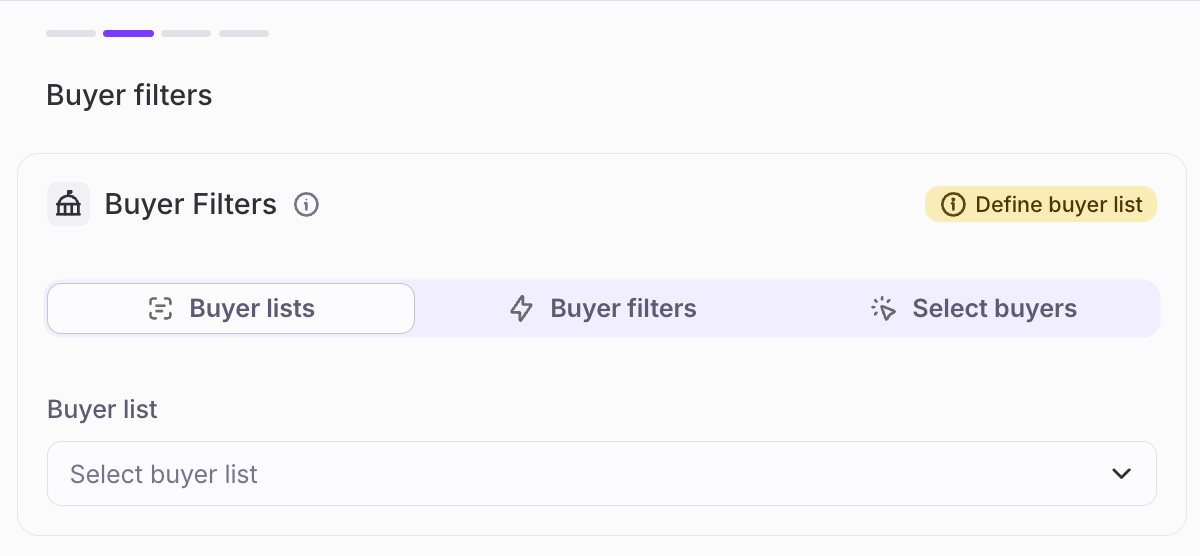
For a full walkthrough of buyer lists — including how to create dynamic lists, import from CSV, and sync from Salesforce or HubSpot — see the How to Create a Buyer List guide.
Unlike Meetings, RFP, Contracts & Purchases, Custom Web Signals, and Job Changes Bridges, new rows won’t get added to your Bridge unless the underlying list of Buyers changes.
Defining your buyer set
There are three ways to define which buyers appear in your Bridge:Buyer list
Buyer list
Select a pre-configured buyer list or territory. This is the most common starting point - if your team has already defined a list (for example, a territory or ICP segment), you can point the Bridge directly at it.Buyer lists can be:
- Dynamic — defined by filters (e.g., K–12 districts in California with enrollment above 5,000), and automatically updated as buyers enter or leave those criteria
- Static — a fixed set of buyers imported from a CSV
- CRM-synced — kept in sync with an existing Salesforce list or HubSpot segment
Buyer filters
Buyer filters
If you don’t want to use a pre-defined buyer list, you can define buyers directly using structured attributes — geography, buyer type, size, classification, and other fields Starbridge maintains. This is useful when you want to build a Bridge scoped to a specific segment without creating a named list first.Examples:
- Cities and counties in Texas with annual budgets above $50M
- Higher education institutions with enrollment above 10,000
- School Districts with over 25% English language learners
Select specific buyers
Select specific buyers
Pick individual buyers by name. Useful for strategic account lists, named accounts, or a focused set of high-priority targets where you want full control over exactly who’s included.
Enriching your Buyers Bridge
The Buyers Bridge is valuable when you enrich buyer data using columns. Each column enriches a row with data pulled from Starbridge’s internal database, the web, your CRM, or AI analysis. The most common use cases are below.Vendor Presence
The Vendor Presence column tells you whether a buyer has an existing relationship with a competitor or complementary vendor, pulled from Starbridge’s internal purchase order and contract data, with an optional web search layer. For each competitor or vendor you track, Starbridge surfaces whether a relationship exists, any available pricing detail, and an explanation of the relationship.Use Confirmed Data only
Shows only vendor relationships explicitly found in Starbridge’s purchase order and contract records. The default setting — every result is sourced.
Use Confirmed & Inferred Data
Adds high-confidence estimates derived from procurement signals where confirmed data isn’t available. Inferred values are clearly flagged.
- Identify accounts where a competitor contract is approaching expiration - high-priority for outbound
- Confirm whether a prospect is already using a complementary tool you integrate with
- Filter your account tier model by incumbent vendor status
Contact column
The Contact column finds the right person to reach at each buyer using web-based search to identify the contact who best matches the role or responsibility you describe. Unlike the Meetings Bridge, which can source contacts directly from meeting transcripts, the Buyers Bridge exclusively uses web-based contact discovery. Describe the type of person you’re looking for - their responsibilities, example titles, and any additional context - and Starbridge will search the buyer’s website, directories, and public sources to find them.Custom Web Enrichment
The Custom Web Agent column type allows you to draft a prompt that can capture bespoke, hard-to-find, and business specific data for each buyer in your Buyers Bridge. Whether you want to enrich data available at the account level in your CRM or whether as an input into Account Scoring, custom web data can be extremely helpful in understanding your territory and market. Some examples include:- Whether a list of cities has received Federal funding for security and safety
- How many distance/virtual learners are enrolled at a list of private schools
- The operating and technology budget of a list of Fire Departments
Account scoring
The most popular use of the Buyers Bridge is building an account scoring model that tiers your entire target market based on a definition of what a “good account” looks like for your team. A scoring column uses an AI Analysis prompt that you write - describing your criteria, the data inputs to consider, and the output format you want. Common scoring inputs include:- Competitor contract expiration timing
- Incumbent vendor and satisfaction signals
- Buyer attributes (enrollment, budget, size, classification)
- CRM data (last contacted, tier, stage)
- Presence of relevant meeting signals or RFPs (via cross-bridge reference)
- Strategic fit indicators (AI adoption, startup friendliness, leadership tenure)
Example account scoring prompt structure
Example account scoring prompt structure
A well-structured scoring prompt typically:
- Defines the score range and what each level means (e.g., 1–5 where 5 = highest priority)
- Lists each input factor with its weight or relative importance
- Describes what “good” looks like for each factor — and what disqualifies or reduces a score
- Specifies the output format (score + rationale, or just a score)
“Score the readiness of {buyer:name} for sales engagement on a scale of 1–5. Use the following inputs: competitor contract expiration (30% weight — score higher if expiring within 12 months), enrollment size (20% — score higher above 10,000 FTE), incumbent vendor (20% — score higher if no current vendor or dissatisfaction signals present), recent meeting signals (15% — score higher if relevant signals in the last 6 months), CRM last contacted date (15% — score higher if not contacted in 90+ days). Return: Score (1–5) and a one-sentence rationale.”
Sync key fields to your CRM
Once your Buyers Bridge has the data you want — scores, contact info, vendor presence, buyer attributes — you can push it back into Salesforce or HubSpot automatically using Sync columns.1
Connect your CRM
Go to Settings → Integrations and connect Salesforce or HubSpot. Grant access to the objects and fields you want Starbridge to read and write.
2
Add a Lookup column
Add a Lookup Record in CRM column to match each buyer row to its corresponding Account or Company record in your CRM. Starbridge supports matching by external identifiers (NCES IDs for school districts, IPEDS for higher ed, Census GEOIDs for cities) or by a custom Starbridge ID field.
3
Add a Sync column
Add a Sync Record in CRM column. Map each Starbridge Bridge column to the CRM field it should populate. Choose whether each field should overwrite existing values or only write if empty.
4
Run and keep updated
Starbridge syncs data into your CRM and keeps it current as underlying data changes — so your account scores, vendor presence data, and buyer attributes stay fresh without manual exports.
Next steps: Explore other bridge types
The Buyers Bridge gives you a complete picture of your accounts. Pair it with signal-based bridges to know when to act.Meetings Bridge
Surface buying signals from board meetings and strategic plans. Cross-reference against your Buyers Bridge to see which of your target accounts are actively discussing problems you solve.
RFP Bridge
Monitor active RFPs from your target buyers. Use your Buyers Bridge as the account foundation to know when a scored account enters procurement.
Purchases Bridge
Track expiring contracts and spend behavior. Combine with your account scoring model to prioritize outreach when a high-tier buyer’s incumbent contract is approaching renewal.
Conference Bridge
Find out which of your target buyers are attending upcoming conferences — and who to reach out to before the event.