

What is the Email Digest?
The Email Digest is a scheduled email that delivers new signals from your Starbridge Feed — daily or weekly. It keeps you on top of opportunities without needing to log into the platform every day. Your Digest reflects the same content as your Feed. Any changes you make to your Feed (hiding bridges, adjusting your territory) will also change what appears in your digest.What’s in the Digest?
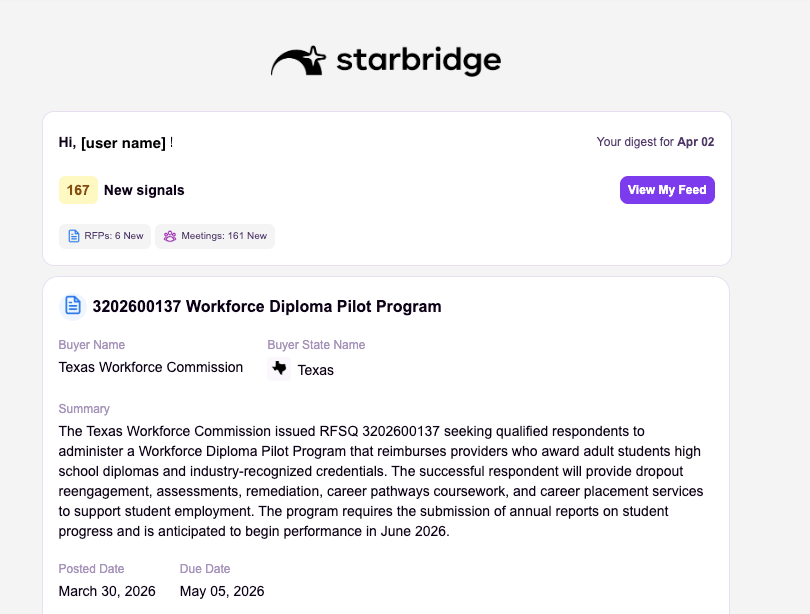
- Breakdown by type: A table showing signal counts by type (Meetings, RFPs, Custom Web Signals, etc.).
- Feed view: Net new signals for your review.
- Footer link: A link at the bottom to customize your Digest settings.
How to set up your Email Digest
1
Open Feed and Email Digest settings
Navigate to Settings.
2
Choose your frequency
Select Daily (8AM EST) or Weekly (Monday 8AM EST).
3
Customize your content
Your Digest reflects your Feed. Hide Bridges, update your territory, or filter by signal type to change what appears.
Troubleshooting
I'm not receiving emails.
I'm not receiving emails.
- Check your spam/junk folder
- Verify your subscription status within “Configure my feed”
- Confirm your email frequency is set (Settings → Feed & Email Digest)
I'm receiving too many emails.
I'm receiving too many emails.
- Switch from Daily to Weekly Digest
- Hide lower-priority Bridges from your Feed and Email Digest
My emails are empty or missing sections.
My emails are empty or missing sections.
- Only new signals trigger emails; if no new data has been added since the last Digest, you won’t receive an email
- Check that your Territory filters aren’t excluding all results
Related articles
My Feed
Review and action signals directly in the platform.
Exploring Bridges
Dive into your Bridges, filter signals, and export data.