

What is my feed?
My feed is your central view for all new signals surfaced by your Bridges. Every time a Bridge detects a relevant buyer signal — a meeting, RFP, purchase, or custom web signal — it appears here as a card. Signals are sorted by most recently updated, so the freshest activity always rises to the top.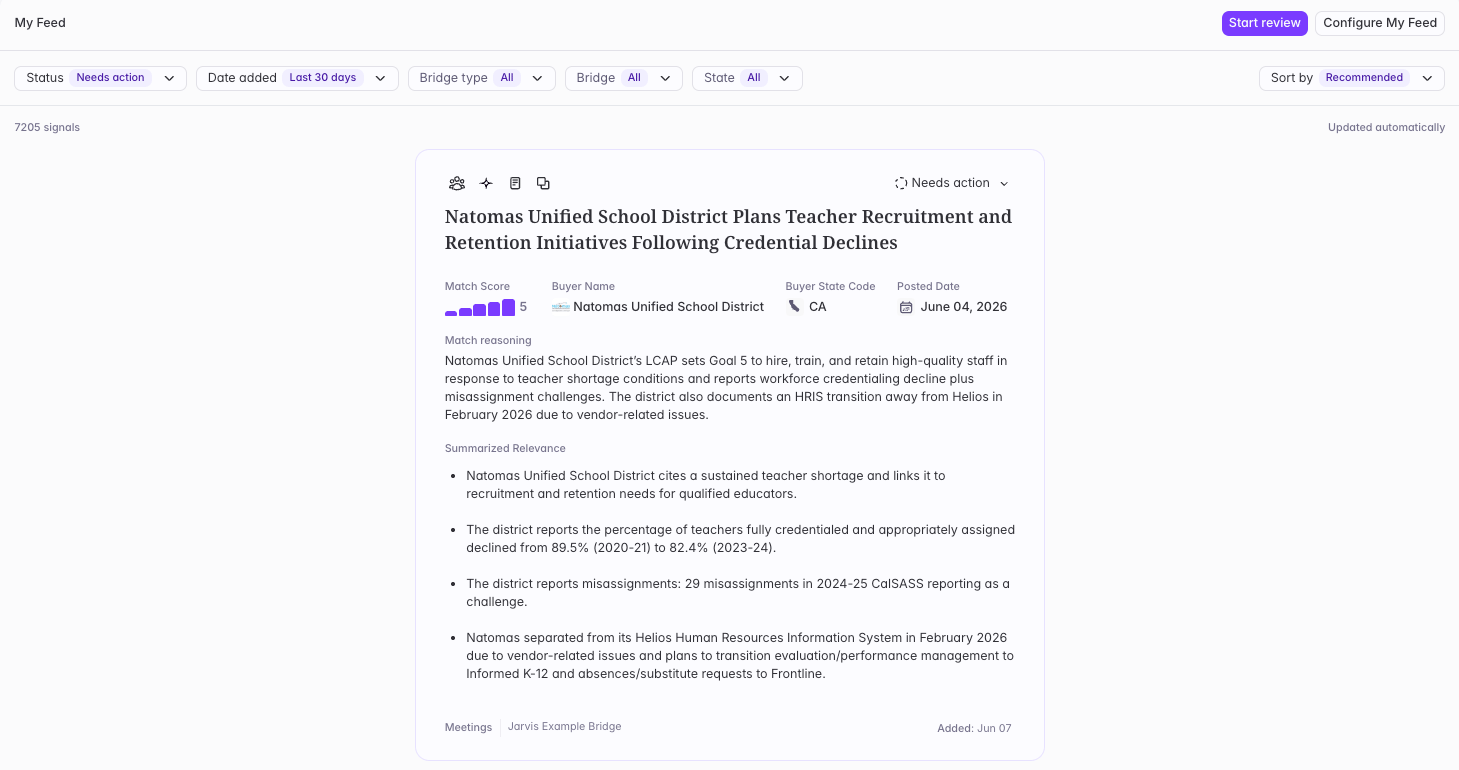
What’s on a signal card?
- Signal type — Meeting, RFP, Purchase, Custom Web Signal, Job Changes, or Conferences
- Source bridge — where it came from, even if it appears in multiple bridges
- Key details — configured by your Builder (buyer name, date, summary, etc.)
- Status — mark as Actioned, Starred, or Not interested. Note: Status will be reflected to all users in the platform.
How to review your feed
- Scroll and act — Browse cards and mark each signal as Actioned, Starred, or Not interested
- Quick Review mode — Click Start Review to enter keyboard-driven review mode
- Filter — Narrow by status, signal type, date added, or Bridge name
- Share a signal — Click the share icon on any card to copy a direct link. Anyone on your plan can view the signal via the link.
Need to make edits to your feed?
If you need to change the Bridges you’re seeing or adjust your territory, reach out to your Admin or Starbridge Builder to make those changes.Related articles
Exploring Bridges
Dive into your Bridges, filter signals, and export data.
Buyer Page
Research any account with everything Starbridge knows in one place.