

Overview
The Conferences Bridge helps you find relevant conferences, evaluate which ones are worth attending, and enrich attendee lead lists before and after the event. Starbridge tracks government and education conferences and surfaces them as a signal type - filterable by buyer type, attendee persona, location, date, and more. Unlike Meetings or RFP Bridges, the signal here isn’t a buying trigger to act on immediately - it’s a calendar of where your buyers will be. The Bridge helps you decide which conferences to invest in and ensures you’re prepared when you show up.Building your Bridge
The Conferences Bridge uses the same Search Agent flow as Meetings and RFP Bridges. You can either start with a natural language description and let Starbridge generate a structured search, or skip straight to configuring filters and search phrases manually.For a full walkthrough of the bridge building flow — including how to use the natural language prompt, review the structured search, and preview results — see the Bridge Building Flow guide.
Configuring your filters
Filters are the primary way to scope a Conferences Bridge. They define which conferences are eligible to appear — by who attends them, where they are, when they happen, and how much they cost to attend.Buyer Types
Buyer Types
Filter to conferences attended by specific buyer segments — for example, K–12 school districts, higher education institutions, cities, or state agencies. This is usually the first filter to set, since it anchors the rest of the search to your target market.
Expected Personas / Titles
Expected Personas / Titles
Filter by the types of decision-makers expected to attend — CIO, CFO, Superintendent, VP Enrollment, Registrar, etc. Use this to surface conferences where your ICP buyers will actually be in the room, not just conferences tangentially related to your vertical.
Expected Attendance
Expected Attendance
Filter by estimated headcount. Useful for calibrating conference size against your team’s capacity — a 200-person regional event and a 10,000-person national conference require very different investment levels.
Start Date
Start Date
Filter to conferences with a start date within a specific time window. Use this to build a forward-looking conference calendar — for example, all relevant conferences in the next 6 months.
Estimated Attendance Cost Range
Estimated Attendance Cost Range
Filter by estimated cost per person to attend. Helps prioritize conferences that fit your event budget without manually reviewing each one.
Organizers
Organizers
Filter to conferences hosted by specific organizers. Useful if you know which associations or bodies run the events most relevant to your buyers — and want to monitor everything they put on.
Location
Location
Filter by state. Useful for territory-based conference planning or when your team’s travel budget is regionally constrained.
Search phrases
Search phrases are optional in a Conferences Bridge. Unlike the Meetings Bridge — where phrases are the primary signal-finding mechanism — conferences are primarily filtered by structured attributes. Search phrases work as a keyword match layer on top of your filters, and are best used when you want to narrow results to conferences where a specific topic, theme, or focus area appears in the conference description.There are no scoring criteria in Conferences Bridges. Instead, every conference that matches your filters appears in the Bridge, and you use the Conference Relevance Score column to evaluate and prioritize results after the fact.
Enriching your Conferences Bridge
Once your Bridge is surfacing the right conferences, add columns to evaluate fit and prioritize your event calendar.Conference Relevance Score
The Conference Relevance Score column uses AI to evaluate each conference against your ICP, business objectives, and the personas you’re trying to reach. Rather than reviewing every conference manually, the score helps you quickly identify which conferences are worth serious consideration and which can be deprioritized. Use the relevance score to:- Compare conferences against each other when your team’s event budget has a fixed number of slots
- Flag high-priority conferences for leadership review
- Assess expected ROI based on attendee profile alignment with your buyers
Custom AI columns
Add custom AI columns to extract specific information from each conference’s data. Useful examples:- Target Persona Match — analyze how well the expected attendee profile aligns with your buyer personas
- Budget Analysis — extract pricing and cost details relevant to your event planning
- Sales Positioning — generate strategic recommendations for booth messaging based on conference themes and attendee profile
Conference lead list enrichment
Once you’ve identified a conference to attend, Starbridge lets you enrich your attendee list directly from the Bridge — turning a raw CSV of names into a scored, contact-enriched list with personalized outreach ready to go.Creating a lead enrichment bridge from a Conferences Bridge
1
Open the conference in your Bridge
Select any conference row in your Conferences Bridge to open the conference modal.
2
Click Enrich Lead List
Select the Enrich conference lead list button in the modal. This links the enrichment bridge directly to that specific conference, giving you access to conference attributes in your Contacts Bridge.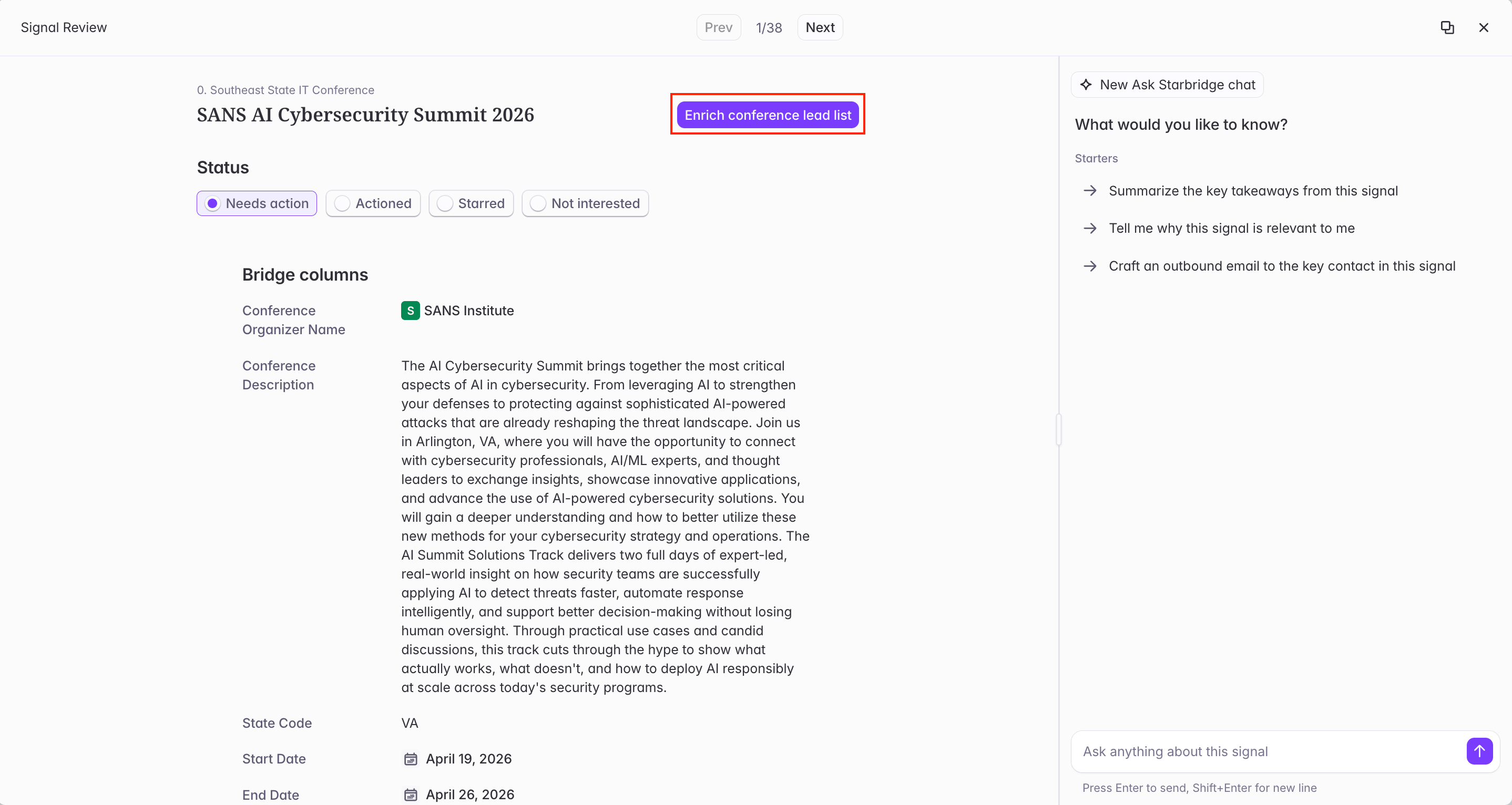
3
Upload your attendee CSV
Upload your attendee list. If you have custom columns in your CSV — session attendance, booth notes, lead scores, CRM IDs — keep them: you can map them into the bridge and reference them in your AI columns.
4
Add enrichment columns
Build out the enrichment bridge the same way you would any contact bridge — add AI columns, web agent columns, and CRM sync columns. Because the bridge is linked to a specific conference, you can reference conference attributes (type
@ to access them) directly in your prompts.Example AI column prompts for a conference lead enrichment bridge:- “Score this lead 1–10 for sales priority based on their title, the sessions they attended, and any booth conversation notes in @[your custom column].”
- “Based on @Conference Description and this contact’s title, identify the most relevant talking point for a follow-up call.”
Conference lead enrichment bridges created from a Conferences Bridge are tagged with a Conference label in your list of bridges, making them easy to identify later.
Next steps: Explore other bridge types
Meetings Bridge
Track buying signals from board meetings and strategic plans — the earliest indicator of a problem your solution solves.
RFP Bridge
Monitor active procurement opportunities across your target buyers as they’re published.
Purchases Bridge
Surface expiring contracts and spend patterns to identify accounts approaching a renewal decision.
Buyer Bridge
Enrich and score your target account list — and sync key fields back to your CRM.