Referencing is built to enrich a list of Buyers — so you’ll add it to a Buyer Bridge, the Bridge that holds the accounts you care about. On its own, a Buyer Bridge tells you about each account (size, location, attributes).Referencing another Bridge helps you check each Buyer on your list against another Bridge and tells you whether, or how often, that Buyer shows up there. You can reference any Bridge except another Buyer Bridge: Meetings, RFPs, Purchases, Conferences, and so on.In plain terms: “For each Buyer on my list, how many times have they appeared in my [RFP / Meetings / Purchases] Bridge?”This is most often used to power account scoring: pulling each account’s RFP activity, buying-intent meetings, and competitor contracts onto one list, then rolling those signals into a score. But it’s just as useful on its own to spot which accounts are heating up.
The reference adds one column to your Buyer Bridge. For each account, the cell shows a count — how many matching items that account has in the Bridge you referenced. (An account can match several rows in the source Bridge, which is why you see a count instead of a single value. A 0 or blank means no matches.)From a populated cell you can:
Click the count to see a summary of the matched items
Select View Results in Reference Bridge to open the source Bridge with that account pre-filtered, alongside all of its columns.
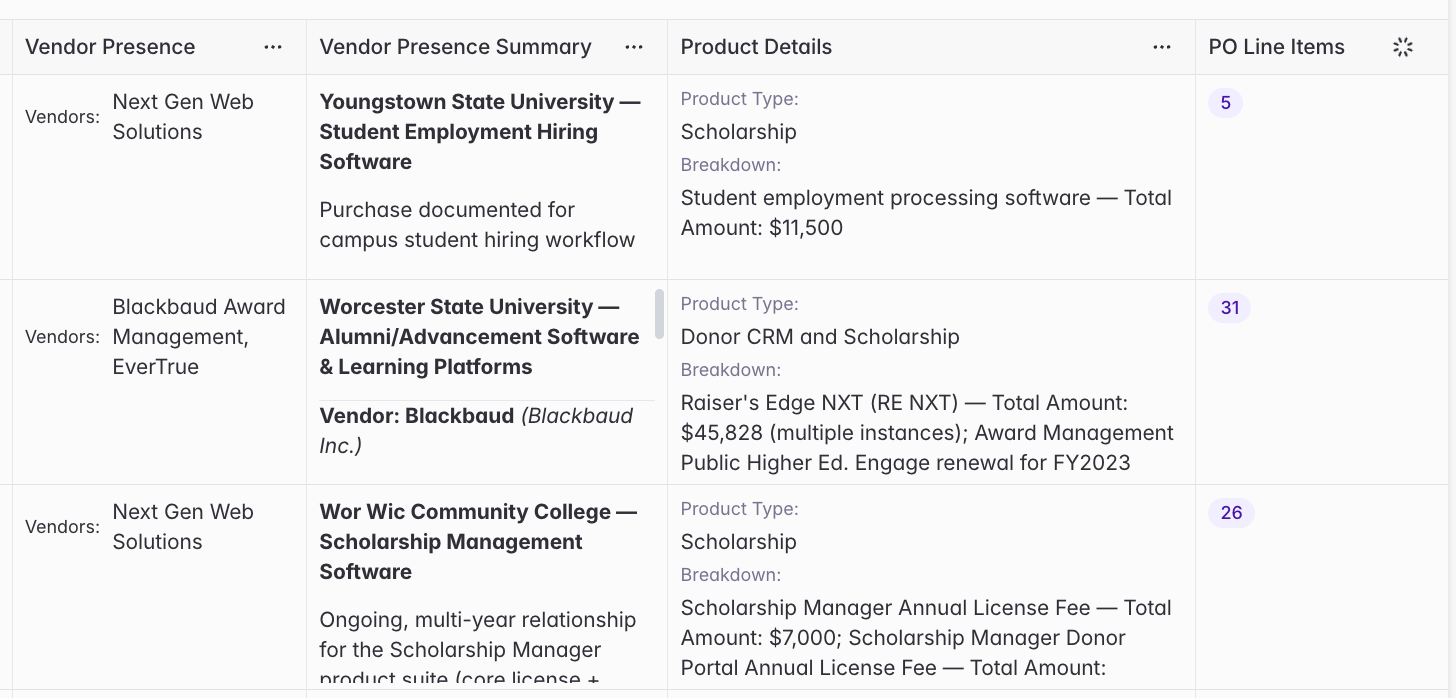
Example: You have a Buyer Bridge of target universities and community colleges, and you reference a Purchases Bridge. The reference column here — PO Line Items — counts how many matching purchase records each institution has: Youngstown State University shows 5, Worcester State University shows 31, and Wor Wic Community College shows 26. Click a count to see the matched purchases (vendors, products, and amounts), so you know which accounts have the most relevant buying activity and can drill in to act on it.
A reference column showing how many times each account appears in the referenced Bridge.
Each of these is a reference column added to a Buyer Bridge of your target accounts:
Flag accounts with open RFPs. Reference an RFPs Bridge, filtered to active (unexpired) RFPs, to see which of your accounts have a live opportunity to pursue right now.
Surface buying intent. Reference a Meetings Bridge that captures pain points or initiatives, so you can see which accounts are signaling intent — e.g., “all meetings, all dates, that mention budget shortfalls.”
Catch expiring competitor contracts. Reference a Purchases Bridge to see which accounts have a competitor contract — e.g., “actioned purchases in the last 12 months that name a competitor” — so you can time outreach ahead of a renewal.
Feed an account score. Add several reference columns (RFPs, meetings, competitor contracts) and use them as inputs to an account scoring column that ranks your list.
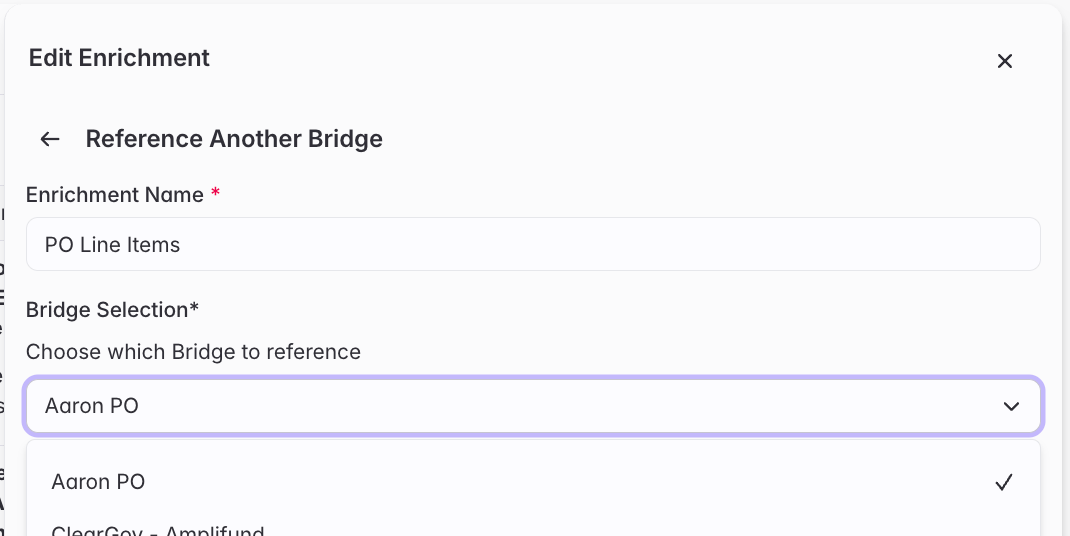
From your Buyer Bridge, click Add enrichment, choose Reference another Bridge, then configure it.
1
Choose the Bridge to reference
Pick any Bridge as the source — Meetings, RFPs, Purchases, Conferences, and so on — except another Buyer Bridge. This is the Bridge each account on your list will be checked against.
Configuring a reference: which Bridge, which mentions, and the time frame.
2
Filter which mentions count
Narrow what counts as a match by status (new, actioned, not interested, or all) and time frame, so the count reflects only the signals you care about. For example, choose actioned mentions in the last 12 months to ignore old or unreviewed signals.
3
Add and run the enrichment
Click Add & Run Enrichment to populate the column. Run a few rows first to confirm the counts look right, then run the rest.